





 History Search
 Recommended For You
 Languge & Currency


Pokémon GO now has a built-in way to automatically attempt Pokémon catches and spin PokéStops while your phone is in your pocket. The Explorer Gadget sounds simple, but its level requirement, daily limits, Poké Ball restrictions, skipped encounters, and interaction with Pokémon GO Plus + make it more interesting than a basic “free auto-catcher.”

For years, Pokémon GO players who wanted to collect Pokémon and PokéStop items without constantly looking at their phones generally relied on a physical accessory. The Explorer Gadget changes that equation. Instead of being a separate Bluetooth device, it is built directly into Pokémon GO and is designed to keep basic exploration running while the game is not actively on screen.
That does not mean the game suddenly plays itself. The feature has deliberate limits, and those limits reveal a lot about what the developers appear to be trying to achieve: make routine exploration easier without replacing manual catches, special encounters, or the role of dedicated accessories for heavy users.
What Is the Pokémon GO Explorer Gadget?
The Explorer Gadget is an in-game auto-catching and PokéStop-spinning feature available to eligible Trainers. Once activated, it can automatically attempt to catch nearby Pokémon by throwing regular Poké Balls and can automatically spin nearby PokéStops while you move through the real world.
The biggest difference from products such as Pokémon GO Plus + is obvious: the Explorer Gadget is software, not hardware. There is nothing extra to carry, charge, pair, or buy. The feature lives inside the Pokémon GO app.
While it is active, you can put your phone in your pocket, lock the screen, or let Pokémon GO run in the background and continue moving at a normal, casual pace. The Gadget can then handle routine nearby interactions on your behalf.
Why the Explorer Gadget Matters
The feature matters for more than convenience. Auto-catching has traditionally been associated with extra accessories, which means passive play was partly separated from the basic app experience. Explorer Gadget brings a limited version of that behavior into the core game.
For a casual player, this can make ordinary trips more productive. A walk to lunch, a commute, an afternoon in a park, or a trip through a busy downtown area can generate catches and PokéStop spins without requiring constant screen attention.
In my view, this is the most important part of the update. The Explorer Gadget is not just another button. It suggests that Pokémon GO is becoming more comfortable with the idea that some routine parts of the game should fit around a player’s day instead of demanding continuous interaction.
Who Can Use the Explorer Gadget?
The Explorer Gadget is intended for Trainers at level 20 or higher. Reaching level 20 is the basic eligibility requirement, but eligibility does not automatically mean the feature will already appear on every account.
This distinction is important because the feature is being released gradually. A level 20, level 40, or even much higher-level Trainer may still not see it immediately if their account has not been included in the current rollout group.
Rollout and Availability
The Explorer Gadget entered an official phased rollout after a period of discovery and testing. Community reporting tracked the feature from earlier datamining through limited tests and later expansion into additional regions before its official debut.
At the time of the announcement, Pokémon GO had not provided a final date when every eligible account worldwide would receive access. That means availability can differ between players even when their Trainer levels are similar.
A gradual rollout makes sense for a feature like this. An automatic catcher affects Poké Ball consumption, item acquisition, Pokémon storage pressure, background activity, and the value proposition of physical accessories. Releasing it in stages gives the developers room to monitor how it behaves at scale.
How to Activate and Use the Explorer Gadget
Getting started is straightforward once the feature is available on your account.
- Open Pokémon GO.
- Find the Explorer Gadget. Look for its icon near the top-right area of the Map View. It can also be found under Key Items in the Item Bag.
- Activate it. Open the Gadget interface and choose to use it.
- Start moving. Keep your smart device with you while walking or moving at a casual pace.
- Put the phone away if you want. The screen can be locked and the feature can continue in the background.
- Check your results later. Open the Gadget again to see a summary of catches and PokéStop activity.
The results screen can show which Pokémon were successfully caught, the total number of Pokémon caught, and the number of PokéStops spun. Community reporting also notes that Pokémon caught by the Gadget are presented from newest to oldest in the summary.
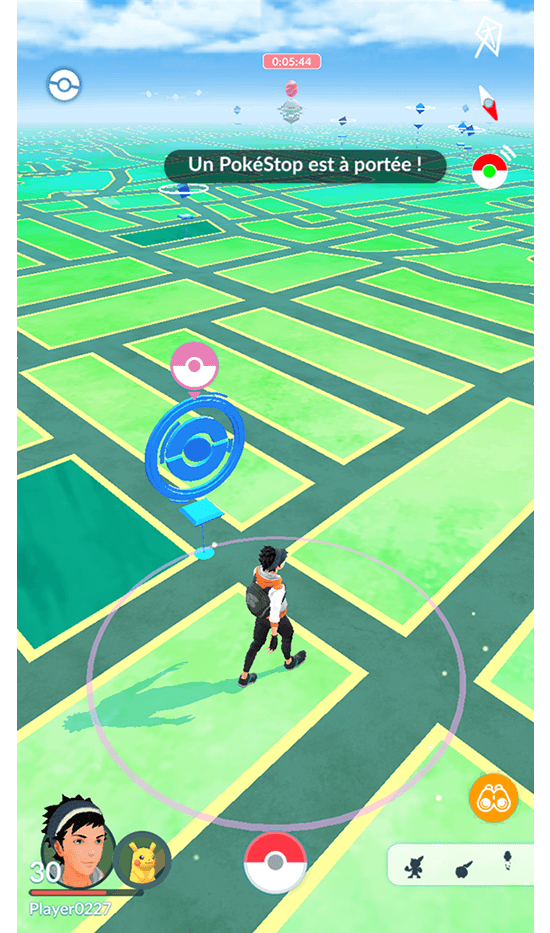
What Does the Explorer Gadget Actually Do?
1. Automatically attempts to catch nearby Pokémon
When an eligible nearby Pokémon is detected, the Gadget can automatically throw a Poké Ball and attempt the catch. The word attempt matters: this is not a guaranteed capture system. Pokémon can still escape.
2. Automatically spins nearby PokéStops
As you pass PokéStops, the Explorer Gadget can spin them automatically, helping you collect routine items without repeatedly opening individual stops on the map.
3. Works during a screen break
The feature is specifically designed for situations where Pokémon GO is not actively open in front of you. That makes it particularly useful for walks, errands, commutes, and other moments when staring at a phone would be inconvenient or undesirable.
Poké Ball Rules: Regular Poké Balls Only
One of the most important restrictions is that the Explorer Gadget uses regular Poké Balls only. It does not automatically switch to Great Balls or Ultra Balls.
This rule changes inventory strategy. Players who routinely delete regular Poké Balls to make room for higher-tier balls may want to keep a healthier supply once they begin using Explorer Gadget. A large stock of Ultra Balls will not help if the Gadget has zero standard Poké Balls available.
Explorer Gadget Daily Catch and PokéStop Limits
The Explorer Gadget has daily limits for both Pokémon catches and PokéStop spins. Pokémon GO officially states that these limits are based on Trainer level.
Pokémon GO Hub reports a more specific rule: the daily limit for each activity is equal to the Trainer’s current level. Under that reported rule, a level 20 Trainer would have 20 Gadget catches and 20 Gadget PokéStop spins available, while a level 50 Trainer would have 50 of each.
Note: Pokémon GO’s official announcement confirms that limits are based on Trainer level. The exact level-equals-limit relationship above is reported by Pokémon GO Hub and should be treated as a currently reported implementation detail that could be adjusted later.
Catch and PokéStop Limits Are Tracked Separately
The catch quota and PokéStop quota are separate counters. Reaching one does not necessarily end the other activity.
For example, imagine your account has a daily allowance of 50 Gadget catches and 50 Gadget PokéStop spins. If the Gadget reaches all 50 catches first, it can stop catching for the day while still continuing to spin PokéStops until that separate 50-spin allowance is exhausted.
This separation makes the feature more useful than a single combined action cap. A player moving through an area with few Pokémon but many PokéStops does not lose their catching quota simply because they collected items.
What Happens When Storage or the Item Bag Is Full?
Inventory capacity still matters. If your Pokémon Storage has no free space, the Explorer Gadget stops catching Pokémon. If your Item Bag is full, it stops spinning PokéStops.
This is why a quick inventory check before a long walk can be more important than the act of turning the Gadget on. If your storage is one slot from full, your “automatic catching session” may be over almost immediately.
What Happens If You Run Out of Poké Balls?
Because the Gadget depends on regular Poké Balls, running out of them is an obvious failure point. Pokémon GO Hub reports two useful behaviors around this situation.
- If the Gadget is activated when you have no regular Poké Balls, the game may provide some Poké Balls to get you started.
- If your regular Poké Balls run out during use, an alert can appear on the Map View.
Even with those safeguards, the better strategy is not to depend on emergency behavior. If you know you want to use the Gadget during a long outing, stock up in advance and leave enough Item Bag capacity for PokéStop spins to refill supplies.
Which Pokémon Will the Explorer Gadget Skip?
The Explorer Gadget does not automatically target every encounter. Pokémon GO specifically identifies categories it will avoid.
Pokémon not yet registered in your Pokédex
If a Pokémon species has not yet been registered in your Pokédex, the Gadget will not automatically attempt the catch. This protects a potentially meaningful first encounter from disappearing into a background process.
Mighty Pokémon
Mighty Pokémon are also excluded from the Gadget’s automatic catching behavior. These encounters are better suited to direct player attention rather than a routine background Poké Ball throw.
The Important Exception for Unregistered Forms
There is an important nuance to the “unregistered Pokémon” rule. Pokémon GO Hub reports that an unregistered form can still be targeted when another form of the same Pokémon species has already been registered.
Oricorio is a useful example. If your Pokédex already recognizes Oricorio through one style, the Explorer Gadget may still attempt to catch a different Oricorio style that you have not personally registered yet.
Why Skipping New Pokémon Is a Smart Design Choice
This is one of the best design decisions in the feature. A background auto-catcher is ideal for routine encounters, but it becomes much less appealing if it can silently consume a player’s first chance at something special.
Pokémon GO is built around moments of discovery. Seeing a Pokémon you have never registered before is fundamentally different from catching the fiftieth common spawn of the day. Treating both encounters identically would make the game more efficient, but also less memorable.
My interpretation is that Explorer Gadget is intended to automate the repetitive layer of Pokémon GO, not the exciting layer. The ideal version of the feature saves you taps without stealing the encounters that you actually want to see.
Can Explorer Gadget Work With Pokémon GO Plus +?
You can keep a physical accessory such as Pokémon GO Plus + paired with the game, but the physical accessory and Explorer Gadget cannot be active at the same time.
That means you do not necessarily need to remove or forget your Plus + connection just to try Explorer Gadget. You choose which system is active for your current play session.
If a physical accessory is paired and you cannot see Explorer Gadget directly on the Map View, the Key Items section of the Item Bag is the place to check for activation.
Important Warning When Switching to a Physical Accessory
This is not a minor interface detail. If you intend to rely on Explorer Gadget during a long day, connecting your Plus + midway through that day can effectively close the Gadget for the remainder of the day.
Decide which option you want before a major event or long outing rather than casually switching between them just to compare performance.
Why Can’t Explorer Gadget and GO Plus + Run Together?
Pokémon GO confirms that the two systems cannot operate simultaneously, but the announcement does not give a detailed technical explanation for that restriction.
There are several reasonable possibilities:
- Avoiding duplicate processing: two auto-interaction systems should not compete for the same spawn or PokéStop.
- Controlling automation: simultaneous systems could potentially increase passive collection beyond the intended balance.
- Keeping product roles clear: a free built-in option and a dedicated physical accessory can coexist more cleanly when each is used independently.
These are design interpretations, not officially stated reasons.
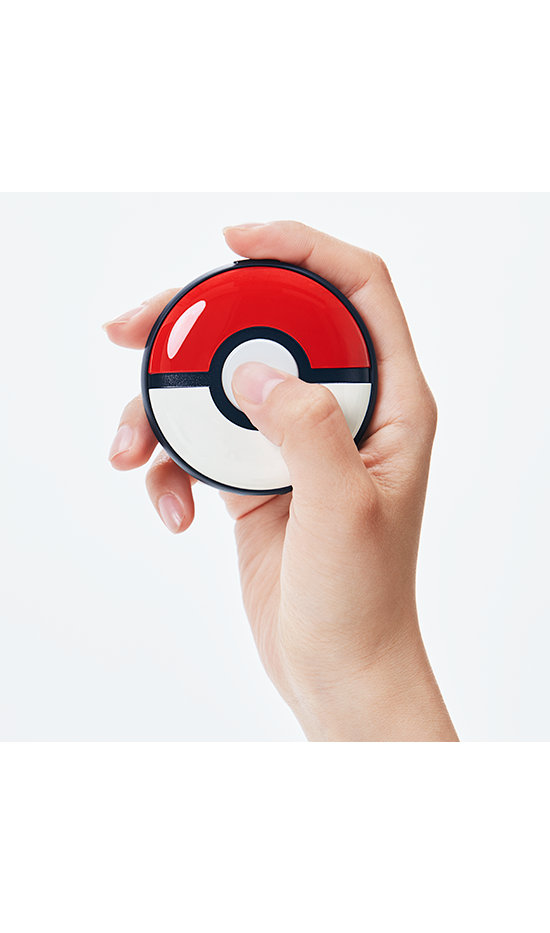
Explorer Gadget vs. Pokémon GO Plus +
The most useful way to understand Explorer Gadget is not to ask whether it is “better” than Plus + in every situation. Instead, look at the role each option fills.
The Explorer Gadget is best described as a free, built-in, limited convenience layer. A physical accessory is a separate product aimed at players who want accessory-based interaction beyond the specific daily structure of Explorer Gadget.
Does Explorer Gadget Make Pokémon GO Plus + Obsolete?
For many casual players, Explorer Gadget can absolutely reduce the need to buy an accessory. If your main goal is simply “catch a few Pokémon and spin some stops while my phone is in my pocket,” the built-in feature covers a large part of that use case at no extra hardware cost.
But that is not the same as making Plus + obsolete. Explorer Gadget is intentionally constrained by daily limits, only uses regular Poké Balls, avoids some encounters, and cannot be stacked with an accessory.
My conclusion is simple: Explorer Gadget is more likely to replace the idea of buying an accessory for light use than it is to replace accessories for committed users.
Who Benefits Most From Explorer Gadget?
Casual players
They get basic auto-catching without paying for another device.
Commuters and walkers
Routine movement becomes an opportunity to collect resources without turning every walk into a phone-focused session.
Returning Trainers
Players coming back after a break can rebuild basic supplies and collect ordinary spawns with less grinding.
Players who want less screen time
This may be the feature’s clearest quality-of-life benefit. Pokémon GO remains connected to movement in the real world, but you do not have to stare at the map every second to get some value from that movement.
How Explorer Gadget Changes Passive Play
Pokémon GO has always had a tension between active and passive play. Active play includes manually checking spawns, choosing berries and balls, completing Research, raiding, battling, managing inventory, and deciding which Pokémon deserve attention.
Passive play is different. The goal is not to make a careful decision about every encounter. It is to let normal movement generate a little progress while the player focuses on something else.
Explorer Gadget makes that second mode feel more like a native part of Pokémon GO. That is a subtle but meaningful shift. Instead of asking the player to choose between “play now” and “get nothing,” the game can now support a third state: keep lightly exploring while living your normal day.
Why the Daily Limit Is the Most Important Design Choice
The regular Poké Ball restriction is noticeable, but the daily quota is arguably the real balancing mechanism.
Without a meaningful daily limit, a built-in background auto-catcher could become an all-day replacement for a large amount of manual play and could dramatically reduce the reason some players use dedicated accessories.
With a daily quota, the feature occupies a narrower role: it gives you a useful amount of convenience, then stops. That makes the Gadget feel less like an AFK farming system and more like a quality-of-life allowance.
This balance is probably why the feature can be offered directly inside the game without completely rewriting the relationship between active play, physical accessories, and item management.
Explorer Gadget Makes Trainer Level More Meaningful
If the currently reported “daily allowance equals Trainer level” rule remains in place, the Explorer Gadget gives leveling a very visible convenience benefit.
Trainer level has long represented progress, account age, unlocks, and long-term commitment. Explorer Gadget can turn that number into a daily passive-play capacity as well.
A level 20 account and a much higher-level account would not simply display different numbers on a profile; they would be able to automate different amounts of daily exploration. That gives higher levels a small but tangible everyday reward without making lower-level players unable to use the feature at all.
Best Practices Before You Turn It On
A thirty-second check can make Explorer Gadget much more effective.
- Keep enough regular Poké Balls. Great Balls and Ultra Balls cannot substitute for them.
- Clear Pokémon Storage. Give the Gadget enough room to keep successful catches.
- Leave Item Bag space. A completely full bag prevents useful PokéStop spinning.
- Choose between Explorer Gadget and your physical accessory before you start. Switching to the accessory can end Gadget availability for that day.
- Use the Gadget for routine movement. Save manual play for important encounters, events, raids, or targeted catching.
- Review the session summary. It helps you understand whether your route and inventory setup are actually producing value.
Is the Explorer Gadget Worth Using?
For eligible players who receive access, there is very little downside to experimenting with it. It does not require a separate purchase, and it can turn otherwise unproductive movement into a small stream of Pokémon catches and PokéStop items.
The biggest question is not whether the feature is “worth the money,” because there is no extra hardware purchase attached to it. The real question is whether its daily quota is valuable enough for your play style.
A player who opens Pokémon GO for ten minutes per day may find the Gadget transformative. A player who spends hours grinding dense spawn areas may burn through the Gadget’s daily allowance very quickly and still prefer a dedicated accessory or manual play for the rest of the day.
My Take: Explorer Gadget Is Bigger Than It Looks
On the surface, Explorer Gadget looks like a small convenience feature: turn it on, put your phone away, get a limited number of automatic catches and spins.
I think its bigger significance is philosophical. Pokémon GO began as a game that encouraged players to look at a map while physically moving through the world. Explorer Gadget keeps the movement but loosens the requirement to constantly look at the screen.
That could be a healthier and more sustainable direction for a location-based game. A walking game should enhance a walk, not always compete with the walk for attention.
The developers also appear to understand the danger of over-automation. Level gating, daily limits, regular Poké Ball-only behavior, skipped special encounters, storage checks, and the inability to run alongside Plus + all work together to keep Explorer Gadget from becoming a universal “play the game for me” switch.
The best way to think about Explorer Gadget is not as a replacement for playing Pokémon GO, but as a way to make the boring parts demand less attention.
Explorer Gadget FAQ
What is the Pokémon GO Explorer Gadget?
It is a built-in Pokémon GO feature that can automatically attempt to catch nearby Pokémon with regular Poké Balls and spin PokéStops while you move.
Is the Explorer Gadget free?
It is built into Pokémon GO rather than sold as a separate physical accessory. You do not need to buy dedicated Explorer Gadget hardware.
What level do you need for Explorer Gadget?
The feature is for Trainers at level 20 and above.
Why don’t I have Explorer Gadget even though I am level 20+?
The feature is being released in phases, so not every eligible account receives access at the same time.
Does Explorer Gadget work with the screen locked?
Yes. It is designed to operate in the background while you move with the device on you, including when the screen is locked.
Does Explorer Gadget guarantee catches?
No. It automatically attempts catches. Pokémon can still escape.
Can Explorer Gadget use Great Balls or Ultra Balls?
No. The official feature description states that it only uses regular Poké Balls.
What is the Explorer Gadget daily limit?
Pokémon GO says the daily catch and PokéStop limits are based on Trainer level. Pokémon GO Hub reports that each limit currently equals the Trainer’s level.
Are the catch and PokéStop limits combined?
No. Community reporting indicates that the two limits are tracked separately.
Will Explorer Gadget catch a new Pokédex Pokémon for me?
It will skip Pokémon that are not yet registered in your Pokédex, according to the official announcement.
Will it catch Mighty Pokémon?
No. Mighty Pokémon are among the encounters specifically excluded from automatic catch attempts.
Can it catch an unregistered form of a Pokémon I already have?
Pokémon GO Hub reports that this can happen. If the species is already registered, the Gadget may target another form that is still missing.
Can Explorer Gadget and Pokémon GO Plus + be active together?
No. You can keep an accessory paired, but Explorer Gadget and a physical accessory cannot operate at the same time.
What happens if I switch from Explorer Gadget to Plus +?
If you switch to a physical accessory while Explorer Gadget is active, the Gadget stops and cannot be used again until the next day.
What happens if my Pokémon Storage is full?
Explorer Gadget stops catching Pokémon when there is no storage space available.
What happens if my Item Bag is full?
Explorer Gadget stops spinning PokéStops when the Item Bag has no room for more items.
Conclusion
Explorer Gadget may look like a smaller update than a new battle mechanic, major event, or headline Pokémon release, but it has the potential to affect everyday play more often than many larger features.
It lowers the barrier to passive catching, gives level 20+ Trainers a built-in alternative for light automatic exploration, and makes it easier to benefit from ordinary movement without keeping Pokémon GO open on screen.
At the same time, the feature remains deliberately limited. Regular Poké Balls only, level-based daily quotas, skipped special encounters, inventory requirements, and the mutually exclusive relationship with physical accessories prevent it from completely replacing manual gameplay or dedicated hardware.
That balance is what makes Explorer Gadget interesting. It does not remove the need to play Pokémon GO. It simply lets the game stay with you during the parts of your day when actively playing is not practical—and for a game built around real-world movement, that may be exactly the kind of quality-of-life feature that makes sense.


