





 History Search
 Recommended For You
 Languge & Currency




BUYMMOG / POKÉMON GO PASSES
Get more from your next Pokémon GO adventure with GO Pass Deluxe at BuyMMOG. Choose the monthly or event Pass you want, compare Standard, +10 Ranks and Ultra Box options, and review the current price before checkout.
Our team purchases your selected upgrade through your account. Orders are usually completed within 5 minutes after successful login. Close Pokémon GO before processing and stay logged out until we confirm completion.
STANDARD & +10 RANKS • ULTRA BOX OPTIONS • 24/7 LIVE SUPPORT
1. Compare Pokémon GO Pass Deluxe Packages
Start with the Pass name, then choose the version. November and Into the Wild have separate reward tracks and deadlines, so select the one you intend to play.
| Package | What it includes | When to choose it |
|---|---|---|
| Standard GO Pass Deluxe | Access to the named Pass’s Deluxe reward track. | You want premium rewards and plan to earn progression through gameplay. |
| GO Pass Deluxe +10 Ranks | The Deluxe upgrade plus the GO Points specified for that Pass’s +10 Ranks option. | You value an included progression boost. Check the event’s starting-rank rules. |
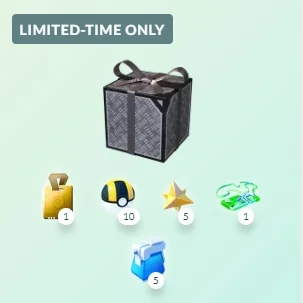
| GO Pass Deluxe Ultra Box | A bundle containing the named Deluxe upgrade and additional items. Included progression and items depend on the box. | You can use the extra supplies and want to compare their value with the smaller packages. |
2. November & Into the Wild: Current Pass Highlights
November 2026 selection • All deadlines below use the local time where you play.
GO Pass Deluxe: November
The November Pass features a Groudon encounter and 400 PokéCoins on its free track. Deluxe adds 1,000 more PokéCoins, bringing the combined total to 1,400, alongside a Super Incubator and additional encounters. These rewards are earned by progressing through the required Ranks.
GO Pass Deluxe: Into the Wild
Into the Wild focuses on event progression, with Deluxe rewards including a Silver Bottle Cap, Dynamax Meltan encounters and Duraludon Pants. The Silver Bottle Cap is earned by completing the Deluxe Pass; it must be used by November 22, 2026, at 11:59 p.m. local time.
| Pass | Earn GO Points and progress | Claim unlocked rewards by |
|---|---|---|
| November | Nov 3, 2026, 10:00 a.m. – Dec 1, 2026, 10:00 a.m. | Dec 3, 2026, 10:00 a.m. |
| Into the Wild | Nov 9, 2026, 10:00 a.m. – Nov 15, 2026, 6:00 p.m. | Nov 17, 2026, 11:59 p.m. |
Pokémon GO Wild Area 2026: Global Ultra Ticket Box
This listing includes the Global event ticket and its advertised box items. It is a separate purchase from GO Pass Deluxe: Into the Wild. Choose according to whether you want the event ticket benefits, the Pass reward track, or both.
Product availability and regional eligibility can change. Check the live listings and your in-game Pass before checkout.
3. Choose Around Your Progress and Playtime
Open your Pass in Pokémon GO and check your current Rank, the rewards ahead and the time remaining. Standard Deluxe can suit a Trainer who has already made progress; +10 Ranks can help when extra progression is useful. An Ultra Box makes more sense when you also need its included items.
You can upgrade an active Pass after starting and collect Deluxe rewards for Ranks you have already reached. Continue earning GO Points for later rewards and claim everything before the separate reward deadline.
For a balance you can spend in the in-game shop, compare our Pokémon GO PokéCoins packages. You can also browse the full Pokémon GO store for related options.
4. Why Choose BuyMMOG?
Compare Versions in One Place
Review the listed Passes, progression options and bundles together. Check the selected product and order total so your purchase matches the rewards you want.
Account Purchase Assistance
Our team handles the selected purchase through your account and confirms when processing is complete.
24/7 Live Support
Ask live chat about product selection before ordering, or contact us after checkout for help coordinating account access and delivery.
5. How to Buy Pokémon GO Pass Deluxe
- Choose the Pass and package. Match the event or month, then select Standard, +10 Ranks or the named Ultra Box.
- Review your order. Check the current price and provide the account information requested at checkout.
- Contact live chat after payment. Close Pokémon GO so our team can coordinate login and process the purchase.
- Wait for confirmation. Stay logged out during processing. Once delivery is confirmed, open the game and check your selected upgrade.
6. Delivery and Account Preparation
Account login is required. Make sure the details you provide belong to the account that should receive the Pass. Avoid opening the game while our team is processing your order.
The usual processing estimate begins after successful login. Account-access issues or additional checks can extend the wait; live chat can help with the current order status.


