




 History Search
 Recommended For You
 Languge & Currency
MONOPOLY GO · GOLDEN BLITZ
The next scheduled Monopoly GO Golden Blitz features The Watcher and Fit Check, two 5-Star Gold Stickers. The trading window runs from November 18, 2026, at 1:00 PM ET to November 19 at 12:59 PM ET.
Missing either sticker? This is the window to arrange an exchange with someone who has an extra copy. Below, you will find the event schedule across multiple regions, a closer look at both featured stickers, and practical steps to prepare your trades before the countdown begins.
Golden Blitz at a Glance
- Featured stickers: The Watcher and Fit Check
- Rarity: Both are 5-Star Gold Stickers
- Scheduled start: November 18, 2026, at 1:00 PM ET
- Scheduled end: November 19, 2026, at 12:59 PM ET
- Scheduled duration: 23 hours and 59 minutes
- Eastern Time offset: EST, UTC−5
Schedule note: The times below reflect the planned event window. Check the Golden Blitz banner and countdown in Monopoly GO for any changes before arranging a trade or placing an order.
Golden Blitz Schedule and Global Times
The Watcher and Fit Check Golden Blitz is scheduled to begin at 6:00 PM UTC on November 18 and end at 5:59 PM UTC on November 19. All entries in the table refer to this same event window.
For players in the United States and Canada, Eastern Time is on EST during this event. The United Kingdom is on GMT, while Sydney and Melbourne are on AEDT. These seasonal offsets are already included below.
| Region / Time Zone | Starts | Ends |
|---|---|---|
| US / Canada — Eastern (EST, UTC−5) | Nov 18, 1:00 PM | Nov 19, 12:59 PM |
| US / Canada — Central (CST, UTC−6) | Nov 18, 12:00 PM | Nov 19, 11:59 AM |
| US / Canada — Mountain (MST, UTC−7) | Nov 18, 11:00 AM | Nov 19, 10:59 AM |
| US / Canada — Pacific (PST, UTC−8) | Nov 18, 10:00 AM | Nov 19, 9:59 AM |
| United Kingdom (GMT, UTC+0) | Nov 18, 6:00 PM | Nov 19, 5:59 PM |
| France / Germany / Italy / Mainland Spain (CET, UTC+1) | Nov 18, 7:00 PM | Nov 19, 6:59 PM |
| Brazil — Brasília / São Paulo (UTC−3) | Nov 18, 3:00 PM | Nov 19, 2:59 PM |
| India (IST, UTC+5:30) | Nov 18, 11:30 PM | Nov 19, 11:29 PM |
| Philippines / Singapore / Malaysia (UTC+8) | Nov 19, 2:00 AM | Nov 20, 1:59 AM |
| Japan / South Korea (UTC+9) | Nov 19, 3:00 AM | Nov 20, 2:59 AM |
| Australia — Sydney / Melbourne (AEDT, UTC+11) | Nov 19, 5:00 AM | Nov 20, 4:59 AM |
| New Zealand — Auckland / Wellington (NZDT, UTC+13) | Nov 19, 7:00 AM | Nov 20, 6:59 AM |
Some countries span multiple time zones. Use the named city or time zone that matches your location rather than applying one country's listed time to every region.
Featured Gold Stickers: The Watcher and Fit Check
Both featured stickers have five stars and a gold frame. Match the sticker name and artwork before sending an exchange request, especially when discussing offers with several players at once.
The Watcher
★★★★★ · Gold Sticker
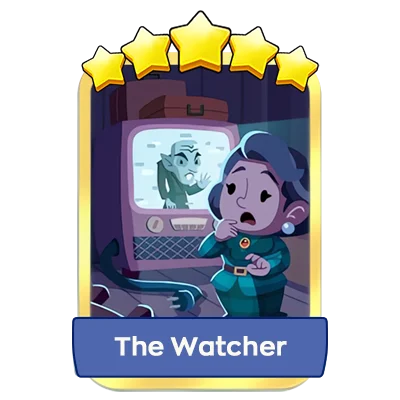
Look for the blue name banner and the scene showing a character beside a television. If The Watcher is one of your missing stickers, check who has a spare copy before the event opens.
Fit Check
★★★★★ · Gold Sticker
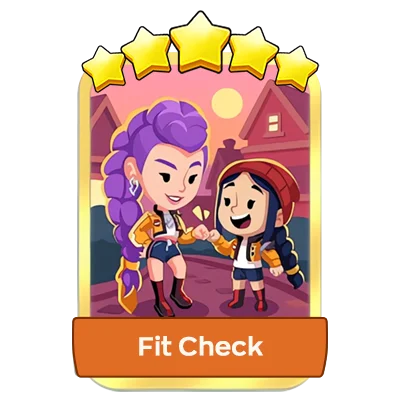
Fit Check has an orange name banner and shows two characters together outdoors. Check your album for the exact sticker so your trading partner knows which card you need.
Which Sticker Should You Get First?
Start with your album rather than an assumed trading value. If one sticker completes a set, prioritize that exchange. If you need both, arrange separate trades and confirm that each partner has a duplicate available. Owning one featured gold does not automatically give you a spare copy to offer.
How Golden Blitz Trading Works
Golden Blitz temporarily allows players to trade selected Gold Stickers. For this scheduled event, the featured pair is The Watcher and Fit Check. Other gold stickers remain restricted unless they are specifically included in the active event.
- Sending requires a duplicate: Your only copy stays in your album; you need an extra to send.
- Receiving does not require a duplicate: You can receive a missing featured sticker even if you have no spare copy of that sticker yourself.
- Check your remaining sends: Use the Golden Blitz counter in the game to confirm what is available before agreeing to an exchange.
- The window matters: Prepare your arrangements in advance, but complete the actual gold-sticker transfer while the relevant event is active.
For an overview of selected gold-sticker trading and Safe Trades, see the official Monopoly GO trading guide .
How to Prepare for The Watcher and Fit Check Golden Blitz
1. Make a Clear Missing-Sticker List
Check whether you need The Watcher, Fit Check, or both. Note which set each missing sticker belongs to and whether getting it would complete that set. This gives you a clear priority when several offers arrive at once.
2. Decide What You Are Willing to Offer
Review your duplicates and agree on the exact exchange. A five-star rating does not establish one universal market value, so compare offers instead of assuming every player wants the same return.
3. Agree on a Time Both Players Can Be Online
Share a time zone along with the date and hour. For example, “November 18 at 1:00 PM EST” is clearer than “tomorrow afternoon.” Use the global schedule above when trading with someone overseas.
4. Set a Reminder Before the Final Hour
Do not make the scheduled closing minute your personal deadline. Leave room for a missed message, an unanswered request, or a replacement trading partner.
How to Trade The Watcher and Fit Check
- Open Monopoly GO and check the event banner. Confirm the active Golden Blitz lists The Watcher and Fit Check.
- Find the eligible duplicate. Select the featured sticker you have an extra copy of.
- Choose the correct friend. Match the recipient's in-game name with the person you agreed to trade with.
- Use “Make an Exchange” for a swap. Review the sticker offered in return before confirming.
- Check the completed result. Confirm the received sticker appears in your album rather than treating a pending request as a finished trade.
Find Missing Monopoly GO Stickers at BuyMMOG
Still looking for The Watcher or Fit Check? Visit the BuyMMOG Monopoly GO sticker shop to check the available selection, current prices, and delivery details for the sticker you need.
Why Choose BuyMMOG?
- Fast Delivery During Golden Blitz: Check live availability for the featured stickers once trading opens. Delivery timing depends on stock, order confirmation, and the active event window.
- Affordable Options: Review the displayed price for the exact sticker you need before choosing your order.
- 24/7 Live Chat: Ask about sticker availability, order requirements, and delivery timing before checkout.
Gold-sticker delivery through in-game sending requires the corresponding Golden Blitz to be active. If the event is close to ending, contact live chat to confirm delivery availability before placing an order.
Frequently Asked Questions
When does the November 18 Golden Blitz start?
The scheduled start is November 18, 2026, at 1:00 PM EST, equivalent to 6:00 PM UTC. In several Asia-Pacific time zones, the same start falls on November 19.
When does The Watcher and Fit Check Golden Blitz end?
The scheduled end is November 19, 2026, at 12:59 PM EST, equivalent to 5:59 PM UTC. Check the in-game timer for the current cutoff.
Are The Watcher and Fit Check five-star gold stickers?
Yes. Both featured stickers have five stars and gold frames. The Watcher has a blue name banner, while Fit Check has an orange name banner.
Can I receive a featured sticker without having a gold duplicate?
Yes. Receiving a missing sticker does not require you to own a gold duplicate. If you are arranging a swap, agree with the other player on what you will offer in return.
Does this event unlock every gold sticker?
No. This Golden Blitz is scheduled to feature The Watcher and Fit Check. A gold sticker from another event does not become tradable simply because a new Blitz is running.
How quickly will BuyMMOG deliver my gold stickers?
BuyMMOG usually sends your purchased stickers within 5 minutes of purchase while the relevant Golden Blitz is active. Orders placed before the event begins will be delivered after trading opens. If you need help, our 24/7 live chat team is available to assist.


